 ,
certify this applet to be safe!
,
certify this applet to be safe!

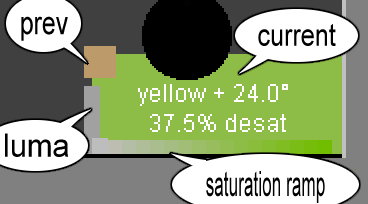
The wedge map in the lower right corner contains a lot of information about the
currently selected color, as well a clickable square of the previous color.
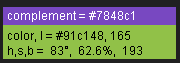 The upper right corner lists statistics for the current color and its complement.
A color's hex value can also be accessed (and copied) via the "Hex Color" box
in the lower left. You can type a hex color there as well.
The upper right corner lists statistics for the current color and its complement.
A color's hex value can also be accessed (and copied) via the "Hex Color" box
in the lower left. You can type a hex color there as well.
Yes, there is a lot going on, but you don't need to know any of it. Click, play, and learn!
The list of named colors has over 1,500 entries. Chirag's sources included Wikipedia's color list, Crayola's® colors, and Resene Paints, Ltd. Note that some color names vary from society to society, even if they both speak the same language. Even within the same society, you may not realize that a given color was named after an architect, say. If you don't recognize a name, search the net for it. You might learn something.
 The little box to the right of the color name contains the exact
color. In most cases the selected color will be an approximation of
the named color. When it is an exact match, the color name is preceded
by an "=". Otherwise the leading character is "~",
for approximately. The leading character may also be "@",
indicating an exact match was attempted, but it does not exist in the set
of colors used.
The little box to the right of the color name contains the exact
color. In most cases the selected color will be an approximation of
the named color. When it is an exact match, the color name is preceded
by an "=". Otherwise the leading character is "~",
for approximately. The leading character may also be "@",
indicating an exact match was attempted, but it does not exist in the set
of colors used.
Umm ... okay. Maybe I should talk about quantization error (QE)¹. The 16-bit SIH color space (aka fc16) uses over 61 thousand colors, but most modern graphic boards will try to display over 24 million². Your monitor cannot display that many, but it can display a lot more than SIH includes. QE occurs when a specified color is not within SIH. Usually it is not noticeable. When there is a possible mismatch, though, the program will create a circle to the left of the "exact-named" square, and fill it with the 24-bit color. This occurs when specifying via the hex color entry box or choosing a color name selected from the list. Sometimes the circle is visually distinct from the quantized color around it. I don't try to hide QE; in fact this project began for the very purpose of ascertaining how well SIH handles general color. (I've learned our eyes are most tuned to the oranges, where flesh tones are. It probably goes way, way back, when discerning friend from foe often meant life or death.) In summary, most of the color surrounding its name is quantized. The square contains the exact 24-bit color for the name, and the circle contains the exact 24-bit color requested.
The list of color names can be re-sorted. It defaults to an alphabetic sort by name. Sorting by hex puts the names in the order they would be in if it were displaying the hex code for the color, such as "#F77703". The hue sort is more algorithmic, sorting primarily by hue, then by saturation, then brightness. I've seen in my web logs some folks find this page with searches such as wheel names for color blue, and I hope this helps them. It is not a pure HSB sort, however. I force colors with very, very low saturation (less than 1/16) to group with the greys. My reasoning is that someone looking for "off whites", say, will expect to see them this way.
¹ Fellow color geeks can toggle on
numeric QE display by clicking the little "brightness box" at the left of the
saturation ramp in the lower right corner.
² If you are using an old 16-bit graphic
board, or if you have your desktop set to use 16-bit graphics on your newer board,
forget what I said about SIH's QE. You are starting with more quantization than
SIH could ever add.
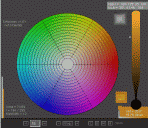 The primary colors¹ are red, green, and blue (RGB). On light-emitting
sources (such as TVs and computer monitors), various combinations of the
primaries add to produce hue, saturation, and brightness.
The primary colors¹ are red, green, and blue (RGB). On light-emitting
sources (such as TVs and computer monitors), various combinations of the
primaries add to produce hue, saturation, and brightness.
The secondary colors¹ are cyan, magenta, and yellow (CMY²). On light-reflecting surfaces (such as books, paintings, and beads), various combinations of the secondaries subtract from the source light to produce the same overall effect. The physical world may be defined in terms of its impurities. The paints available to artists are not pure cyan, magenta, and yellow. Instead an artist has a variety of pigments from which to choose, often based on the color of various metallic oxides.
In the purer digital world, it may be clear why my wheel has its six conical regions (aka sextants). Each primary and secondary forms its own family of shades. Observe how the hues slowly and intuitively transition. Also, observe how the primaries and secondaries are opposite. Red is opposite cyan, for example.
Take a look at the color intensity wedge on the right. Did you notice how it tapers near the bottom? Is your intuition telling you why? If not, interact with the wedge in the Java applet above. Click high, then click low, where it is beginning to taper. Keep an eye on what happens to overall saturation.
¹ Art classes often teach about a
12-color wheel. It names red, yellow, and blue as the "RYB" primaries,
and orange, violet, and green as secondaries. That information is not
incorrect; mixing paints as they suggest works. However, many artists
actually working on canvass do not wish to confine themselves to the
simplified 12-color context. For example, Don Jusko's
Real Color Wheel
(RCW) maps a more complete color wheel, referencing actual pigments.
² You may have seen the acronym CMYK,
relating to printing with color. C, M, and Y you know. The K is
for blacK. CMY inks by themselves produce a dark murky brown, so
professional printers also use black ink where true black is desired. RGB does
not have an equivalent problem. As light sources, maximal equal levels of
red, green, and blue form white, and their total absence form black.
| Grey Mode | Red | Green | Blue |
|---|---|---|---|
| luma | .299 | .587 | .114 |
| Luminance | .212671 | .715160 | .072169 |
| average | .333333 | .333333 | .333333 |
You can experiment with these conversions by clicking the text [luma] in the lower left of the window. All conversions to grey will follow the selected [luma], [Lumi] (Luminance), or [ave] setting.
Double-clicking the wheel's center results in both the wedge and wheel displaying luma, Lumi, or ave (as selected). Double-clicking the wheel outside of the center restores normal color mode.
![screen capture of [luma] text](images/lumaBlock.png "original [luma] button") Since April 2000, users have had the ability to rearrange the order of colors
in both the hueborhood and the sat/luma snake. The [luma] button, at the
lower left corner of the painting canvas, allows ordering by luma, luminance,
and average. Procedurally, each color is represented as one of those
greyscale equivalencies. Then they are sorted and redisplayed in my
"square snake" (spiraling inward) fashion. For over a decade, that was
the extent of my sorting.
Since April 2000, users have had the ability to rearrange the order of colors
in both the hueborhood and the sat/luma snake. The [luma] button, at the
lower left corner of the painting canvas, allows ordering by luma, luminance,
and average. Procedurally, each color is represented as one of those
greyscale equivalencies. Then they are sorted and redisplayed in my
"square snake" (spiraling inward) fashion. For over a decade, that was
the extent of my sorting.
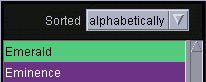 ... then came the list of color names in October 2010. My original goal
was to simply display them in alphabetical order, as I saw in Chirag Mehta's
page. The
list of color names was supplied in hex order, so I'd need an alphabetic sort
by name. Once the infrastructure existed to do that, it occurred to me
there might be other interesting ways to order the colors. Sorting by
hue was obvious; the heart of the SIHwheel is the way it transitions
from hue to hue. And since they were already in hex order, why not
show that too? Thus the first three list sorts were born.
... then came the list of color names in October 2010. My original goal
was to simply display them in alphabetical order, as I saw in Chirag Mehta's
page. The
list of color names was supplied in hex order, so I'd need an alphabetic sort
by name. Once the infrastructure existed to do that, it occurred to me
there might be other interesting ways to order the colors. Sorting by
hue was obvious; the heart of the SIHwheel is the way it transitions
from hue to hue. And since they were already in hex order, why not
show that too? Thus the first three list sorts were born.
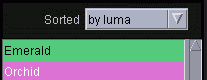 Within days I realized there was an imbalance. The user could sort
within the color wheel pane by luma/Lumi/ave. Yet they could not sort
the name list in that fashion. Well, they can now. Coincident
with that effort, I was in correspondence with the mathematician Aubrey
Jaffer, who has done extensive work concerning the display of "color dictionaries."
He had suggested:
Within days I realized there was an imbalance. The user could sort
within the color wheel pane by luma/Lumi/ave. Yet they could not sort
the name list in that fashion. Well, they can now. Coincident
with that effort, I was in correspondence with the mathematician Aubrey
Jaffer, who has done extensive work concerning the display of "color dictionaries."
He had suggested:
Use of a space-filling curve to traverse the 3-dimensional color space cube might improve the local color neighborhood images.
 I did not know what he meant at first, but it sounded intriguing. It
turns out he was talking about improving the hueborhood and sat snakes, but
the concept was equally applicable to the color name list. He provided
me with a short program he wrote to compute a "Hilbert curve key" from a
3-dimensional color coordinate (e.g. RGB, CIELAB, and HSB).
Sorting these keys results in quite smooth transitions. This enabled me
to add sorts for by h:rgb, by h:lab, and
by h:hsb.
I did not know what he meant at first, but it sounded intriguing. It
turns out he was talking about improving the hueborhood and sat snakes, but
the concept was equally applicable to the color name list. He provided
me with a short program he wrote to compute a "Hilbert curve key" from a
3-dimensional color coordinate (e.g. RGB, CIELAB, and HSB).
Sorting these keys results in quite smooth transitions. This enabled me
to add sorts for by h:rgb, by h:lab, and
by h:hsb.
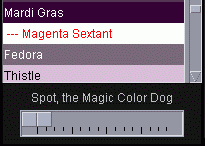 You can well imagine that when Spot, the Magic Color Dog heard about
all these re-sortable colors in one place, he had to come and check it
out. He decided to stay, so I built him a dog house we call
the Slider. When you mess with his house, he will start to
play. He happily jumps from color to color, in the order of the
current sort. He even leaves short-lived shadows behind, so you can
see where he just was. He hates the alphabetic sort, because
while humans see order in the names, he knows there is no order to the actual
colors. He loves by hue, though, because its order is finely
tuned to that of the wheel itself. He likes the three Hilbert sorts a
lot, too. With them, he gets to play mathematician, happily tracing a
Hilbert curve path through a three-dimensional color space.
You can well imagine that when Spot, the Magic Color Dog heard about
all these re-sortable colors in one place, he had to come and check it
out. He decided to stay, so I built him a dog house we call
the Slider. When you mess with his house, he will start to
play. He happily jumps from color to color, in the order of the
current sort. He even leaves short-lived shadows behind, so you can
see where he just was. He hates the alphabetic sort, because
while humans see order in the names, he knows there is no order to the actual
colors. He loves by hue, though, because its order is finely
tuned to that of the wheel itself. He likes the three Hilbert sorts a
lot, too. With them, he gets to play mathematician, happily tracing a
Hilbert curve path through a three-dimensional color space.
Spot can go extremely fast, so much so that I had to train him to go no more than 4 jumps per second. Any faster, and the flashing might cause problems for people susceptible to seizures. The slider is used to control his speed. When it is fully to the right, he obediently moves at 4 jps. As the slider moves leftward he slows down. When it is almost fully to the left, he takes almost 4 seconds per jump. Fully to the left, and Spot stops, waiting for you to specifically command him by clicking in the wheel.
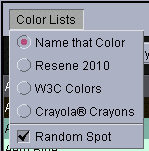 You can select from several Color Lists for Spot to play on. The Name
That Color list is the original set of named colors from Chirag Mehta.
Over time, other lists than those shown are likely to be added. Spot can
even play completely on his own, ignoring the current list. If you check
Random Spot, he will jump around the entire color space in an almost
random fashion, until you have him stop.
You can select from several Color Lists for Spot to play on. The Name
That Color list is the original set of named colors from Chirag Mehta.
Over time, other lists than those shown are likely to be added. Spot can
even play completely on his own, ignoring the current list. If you check
Random Spot, he will jump around the entire color space in an almost
random fashion, until you have him stop.
By the way, Spot does not mind if you change his environment while he is playing. You can perform another sort for example, or manually select a color from the list for him to jump to. You can even change the size of the wheel. The dude is tireless, house-trained, and behaves well with children.

Built with Oracle's (free!)
Java Development Kit
For more Java info, check out Roedy Green's
Java Glossary
Hey, Cool! SIH is a quantized
version of the colorspace Java calls HSB.
If you wish, you may run SIHwheel.jar as a stand-alone program.
This Page

Validated